
Sketch – The Writer component
Edit documents securely in Microsoft Word
Document generation is rarely the final step in a business process. In many organizations, documents still require additional information before they can be approved, signed or sent. This may include adding standard clauses, selecting optional sections, completing customer-specific information or validating the final content.
The challenge is finding the right balance between flexibility and control. Giving users unrestricted access to a document increases the risk of inconsistencies, accidental changes or non-compliant content. On the other hand, locking the entire document leaves no room for legitimate business adjustments.
The SmartDigiDocs Writer component addresses this challenge by allowing users to work directly inside Microsoft Word while ensuring that document integrity is preserved.
Work in Microsoft Word
The Writer component is available as a Microsoft Word add-in, allowing users to edit documents in an environment they already know and use every day.
There is no need to switch to another application or learn a dedicated editor. Documents remain in Microsoft Word throughout the review and completion process, making adoption straightforward for business users.
Controlled document enrichment
Instead of allowing free editing throughout the document, the Writer component provides a list of document fragments that are available for the current document.
These fragments are supplied by the SmartDigiDocs application and are validated for the document being edited. Users simply select the appropriate fragment and insert it where required.
This approach makes it easy to enrich documents while ensuring that only relevant and approved content can be added.
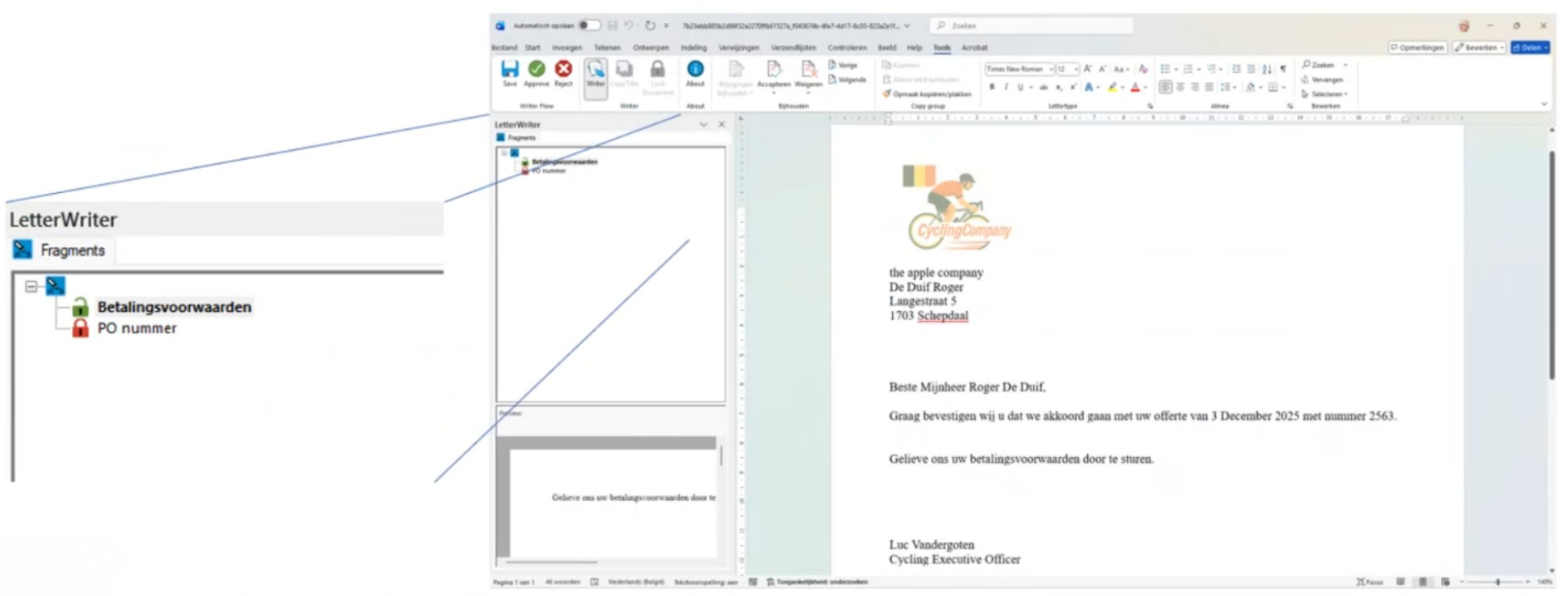
Protect sensitive content
Not every part of a document should be editable.
Some sections may contain mandatory legal clauses, standard contractual wording or other information that must remain unchanged. The Writer component distinguishes between editable and protected content, preventing unauthorized modifications where necessary.
This allows organizations to give users the flexibility they need without compromising document consistency or governance.
Preview before inserting
Before inserting a fragment, users can preview its content directly within the Writer component.
This makes it easier to choose the correct fragment and reduces the risk of inserting unnecessary or incorrect content into the document.
Integrated workflow actions
The Writer component also includes workflow actions directly within the Microsoft Word ribbon.
Users can perform the required document actions without leaving Word, keeping the editing and validation process within a single working environment.
A familiar user experience with built-in control
By combining the familiarity of Microsoft Word with controlled document editing, the Writer component enables organizations to simplify document completion without sacrificing governance.
Business users work in an environment they already know, while SmartDigiDocs ensures that only approved content can be inserted, protected sections remain unchanged and document workflows continue seamlessly from creation to approval.